


SQL Server 2025 - AI Vector search
Reflections on a Microsoft Netherlands event about Vector Search in SQL Server 2025

SQL Server 2025 and Vector Search
Yesterday I attended an event at Microsoft Netherlands where one of the main topics was the new Vector Search capability in SQL Server 2025. It was one of those sessions that immediately makes you think less about hype and more about practical implementation: how do we bring AI-style search closer to the systems companies already rely on every day?
Once I got home, I wanted to try this feature for myself. In this blog post, I want to walk through the steps I took to explore Vector Search in SQL Server 2025 and explain them a bit further for anyone who wants to follow a similar path.
Starting SQL Server 2025 in Docker
To get started, I first spun up a Docker container running SQL Server 2025 so I had a local environment to experiment with. I did that as follows:
Create a docker-compose.yml:
services:
  sqlserver:
    image: mcr.microsoft.com/mssql/server:2025-latest
    container_name: sqlserver2025
    environment:
      - ACCEPT_EULA=Y
      - MSSQL_SA_PASSWORD=<your_password>
    ports:
      - "1433:1433"
    volumes:
      - sqlserver2025:/var/opt/mssql

volumes:
  sqlserver2025:
Create the container:
docker compose up -d
Now it's possible to connector to your server localhost with user sa and your choosen password. I used SQL Server Management Studio to do that.
Create a database and the external model
The first step was creating a small database dedicated to this proof of concept. I kept the schema intentionally simple: one table stores the original product data, while a second table stores the generated vector embeddings for each product. That separation makes it easier to keep the source content readable while still preparing the data for similarity search scenarios.
For this initial setup, I created the database and both tables with the following SQL:
CREATE DATABASE [poc-embeddedsearch];

USE [poc-embeddedsearch]

CREATE TABLE dbo.Product (
    [Id] INT IDENTITY(1,1) PRIMARY KEY,
    [Name] NVARCHAR(MAX),
    [Description] NVARCHAR(MAX),
    [CreatedAt] DATETIME2 NOT NULL DEFAULT GETUTCDATE()
);
GO

CREATE TABLE dbo.ProductChunk (
    [Id] bigint IDENTITY(1,1) PRIMARY KEY,
    [ProductId] int NOT NULL,
    [Embedding] vector(1536) NOT NULL,
    CONSTRAINT FK_DocumentChunk_Product
        FOREIGN KEY (ProductId) REFERENCES dbo.Product(Id)
);
Before we can fill those tables with some test data, we need to tell the database which external AI model he can use. So let's start with creating a master key which is needed to create scoped credentials:
CREATE MASTER KEY ENCRYPTION BY PASSWORD = '<your_password>';
Now it's possible to create the external model which will be used to create the embeddings. I used Azure to host the text-embedding-3-large model:
CREATE DATABASE SCOPED CREDENTIAL [https://<your_resource>.cognitiveservices.azure.com/]
WITH IDENTITY = 'HTTPEndpointHeaders',
     SECRET = '{"api-key":"<your_key>"}';
GO

CREATE EXTERNAL MODEL AzureOpenAIEmbeddings
WITH (
    LOCATION   = 'https://<your_resource>.cognitiveservices.azure.com/openai/deployments/text-embedding-3-large/embeddings?api-version=2024-02-01',
    API_FORMAT = 'Azure OpenAI',
    MODEL_TYPE = EMBEDDINGS,
    MODEL      = 'text-embedding-3-large',
    CREDENTIAL = [https://<your_resource>.cognitiveservices.azure.com/],
    PARAMETERS = '{"dimensions":1536}'
);
GO
Use the following query to see which external models are registered inside the database:
SELECT * FROM sys.external_models;
Now we have everything in place to populate those tables with some data and do some queries with embeddings.
Populate the tables with some data
Before we can create some test data with need to make sure that the AI_GENERATE_EMBEDDINGS function is enabled. You can do that as follow:
EXECUTE sp_configure 'external rest endpoint enabled', 1;
RECONFIGURE WITH OVERRIDE;
Create some data:
INSERT INTO dbo.Product ([Name], [Description]) VALUES
(N'Canyon Aeroad CF SLX', N'High-performance carbon race bike, aerodynamic frame, Shimano Ultegra Di2, disc brakes.'),
(N'Specialized Tarmac SL7', N'Lightweight carbon frame, integrated cockpit, SRAM Force eTap AXS, race geometry.'),
(N'Apple iPhone 15 Pro', N'Latest Apple smartphone with A17 chip, 256GB storage, 6.1-inch display.'),
(N'Samsung Galaxy S24 Ultra', N'Flagship Android phone, 200MP camera, 6.8-inch AMOLED display, S Pen support.'),
(N'Sony WH-1000XM5', N'Noise-cancelling wireless headphones, 30-hour battery, touch controls.'),
(N'Levi''s 501 Original Jeans', N'Classic straight fit jeans, 100% cotton, button fly.'),
(N'Patagonia Down Sweater Jacket', N'Lightweight, windproof, and water-resistant down jacket for cold weather.'),
(N'Nike Air Zoom Pegasus 40', N'Running shoes with responsive cushioning and breathable mesh upper.'),
(N'Bose SoundLink Revolve+', N'Portable Bluetooth speaker, 360-degree sound, water-resistant.'),
(N'Canon EOS R8', N'Full-frame mirrorless camera, 24MP sensor, 4K video recording.'),
(N'Giant Propel Advanced Pro', N'Aero carbon frame, integrated seatpost, Shimano Ultegra, tubeless-ready wheels.'),
(N'Apple MacBook Air M3', N'13-inch laptop, Apple M3 chip, 16GB RAM, 512GB SSD.'),
(N'North Face Borealis Backpack', N'Comfortable, durable backpack with 28L capacity and laptop sleeve.'),
(N'Adidas Ultraboost 23', N'Performance running shoes, Primeknit upper, Boost midsole.'),
(N'Fitbit Charge 6', N'Fitness tracker with heart rate monitor, GPS, and sleep tracking.'),
(N'Uniqlo Supima Cotton T-Shirt', N'Soft, durable t-shirt made from premium Supima cotton.'),
(N'GoPro HERO12 Black', N'Action camera, 5.3K video, waterproof, voice control.'),
(N'Kindle Paperwhite', N'E-reader with 6.8-inch display, adjustable warm light, waterproof.'),
(N'BMC Teammachine SLR01', N'WorldTour proven, carbon layup, electronic shifting, premium race handling.'),
(N'Apple AirPods Pro (2nd Gen)', N'Wireless earbuds with active noise cancellation and MagSafe charging case.');
GO

INSERT INTO dbo.ProductChunk (ProductId, Embedding)
SELECT
    p.Id,
    AI_GENERATE_EMBEDDINGS(p.Description USE MODEL AzureOpenAIEmbeddings)
FROM dbo.Product AS p
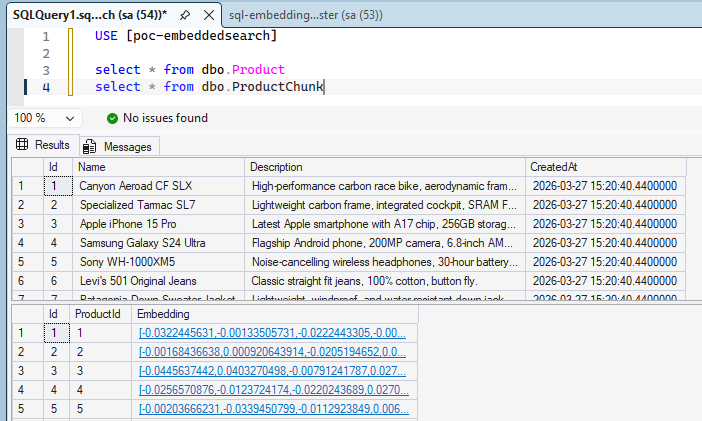
With our tables populated, we now have sample data available for testing.
Test a query with embeddings
With the data in place, it's now possible to do some queries. You can do things like:
DECLARE @question nvarchar(max) = N'Could you give me a list where all the bikes are on top?';
DECLARE @question_embedding vector(1536);

SET @question_embedding =
    AI_GENERATE_EMBEDDINGS(@question USE MODEL AzureOpenAIEmbeddings);

SELECT *
FROM dbo.ProductChunk AS pc
JOIN dbo.Product AS p
  ON p.Id = pc.Id
ORDER BY VECTOR_DISTANCE('cosine', @question_embedding, pc.Embedding);
GO
Conclusion
What I like about this feature is how practical it feels. Instead of moving product data into a separate vector database just to experiment with semantic search, SQL Server 2025 makes it possible to keep the data, embeddings, and queries close together in the same environment.
This was only a small proof of concept, but it already shows the potential. If you are already working with SQL Server and want to explore AI-driven search scenarios, vector search looks like one of the most interesting additions in this release.
I also expect this functionality to move even further into the SQL Server engine itself in the future. If that happens, these kinds of AI scenarios could become a much more natural part of the platform instead of feeling like an add-on around it.